InternationalStudent Hub
Home

Filing your taxes

Filing your taxes with UFile

A guided walkthrough for international students: which boxes to tick, which slip goes where, and the questions that trip people up.

Sources last verified September 26, 2026

Know these first4

  • File by April 30

    The return for a calendar year is due by April 30 of the next year. Filing late when you owe tax can add penalties and interest; filing late when you are owed a refund or benefits delays the money.

  • File even with little or no income

    Filing is how the CRA works out benefits such as the Canada Groceries and Essentials Benefit (which replaced the GST/HST credit in July 2026), and it records your unused tuition amounts so you can use them in later years when you earn more.

  • Your residency status comes first

    Many international students who come to study and set up a home here are residents of Canada for tax purposes, but it depends on your residential ties, such as a home, a spouse or dependants in Canada. The CRA explains the categories, and if you are unsure you can ask for its opinion with Form NR74.

  • Filing can cost you nothing

    UFile ONLINE is free for post-secondary students at any income, including NETFILE, with its student code. Free tax clinics run by volunteers also help people with a modest income and a simple tax situation.

Before you start4

  • Your Social Insurance Number (SIN), if you have one.

  • Every slip you received: T4 from each job, T4A for scholarships or awards, T5 from your bank if you earned interest, and T2202 for tuition (download it from Bear Tracks).

  • The date you arrived in Canada, if this is your first return, and any income you earned before arriving.

  • Last year's Notice of Assessment, if you filed before. It has the NETFILE Access Code; first-time filers do not need one.

Step by step14

From an empty return to NETFILE. The numbers on each screen match the list under its step.

  1. Step 1: Create your return

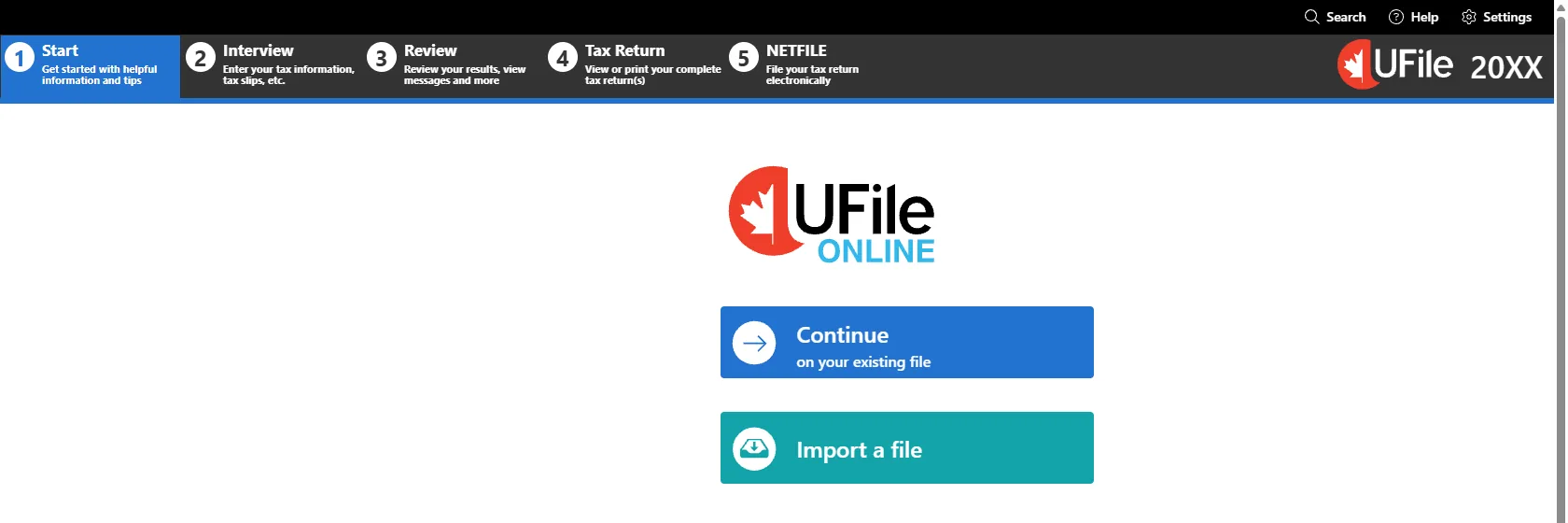
    Go to ufile.ca, sign up for UFile ONLINE, and on My Files pick the tax year you are filing, then Go! and Launch. UFile walks you through five stages along the top: Start, Interview, Review, Tax Return and NETFILE. Press Start Now to begin the Interview.
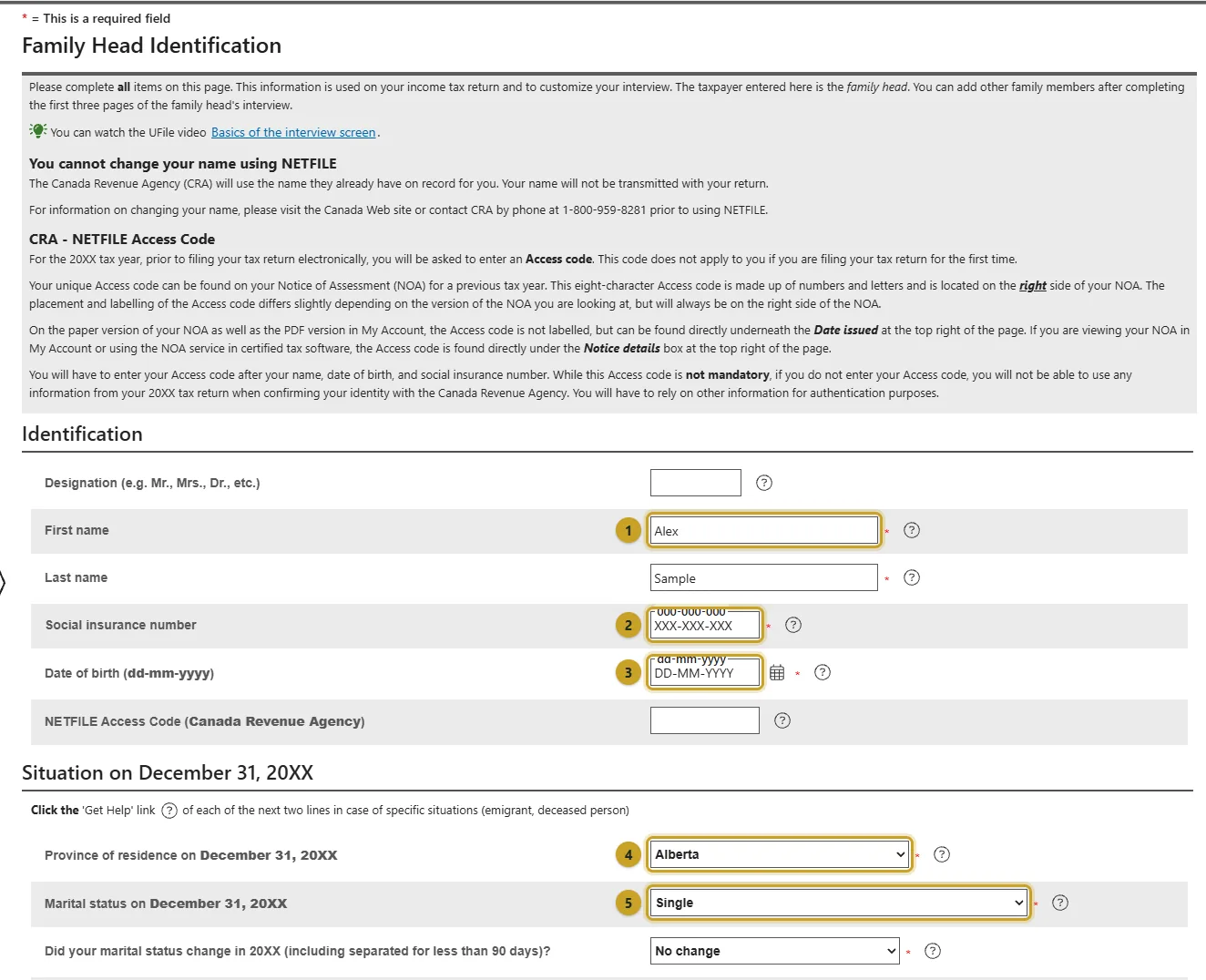
  2. Step 2: Identification: who you are, and where you lived on December 31

    Enter your name exactly as the CRA has it, your SIN and your date of birth. The line that matters most is Province of residence on December 31: if you lived in Edmonton as a resident for tax purposes, pick Alberta. Deemed resident and Non-resident are for different situations; read Your residency status comes first above before choosing either.
    1. Your name as the CRA has it.
    2. Your SIN. Leave the NETFILE Access Code below it blank if this is your first return.
    3. Date of birth, as dd-mm-yyyy.
    4. Province of residence on December 31. Alberta for most UAlberta students.
    5. Marital status on December 31. Married or common-law adds spouse questions later, even if your spouse lives abroad.
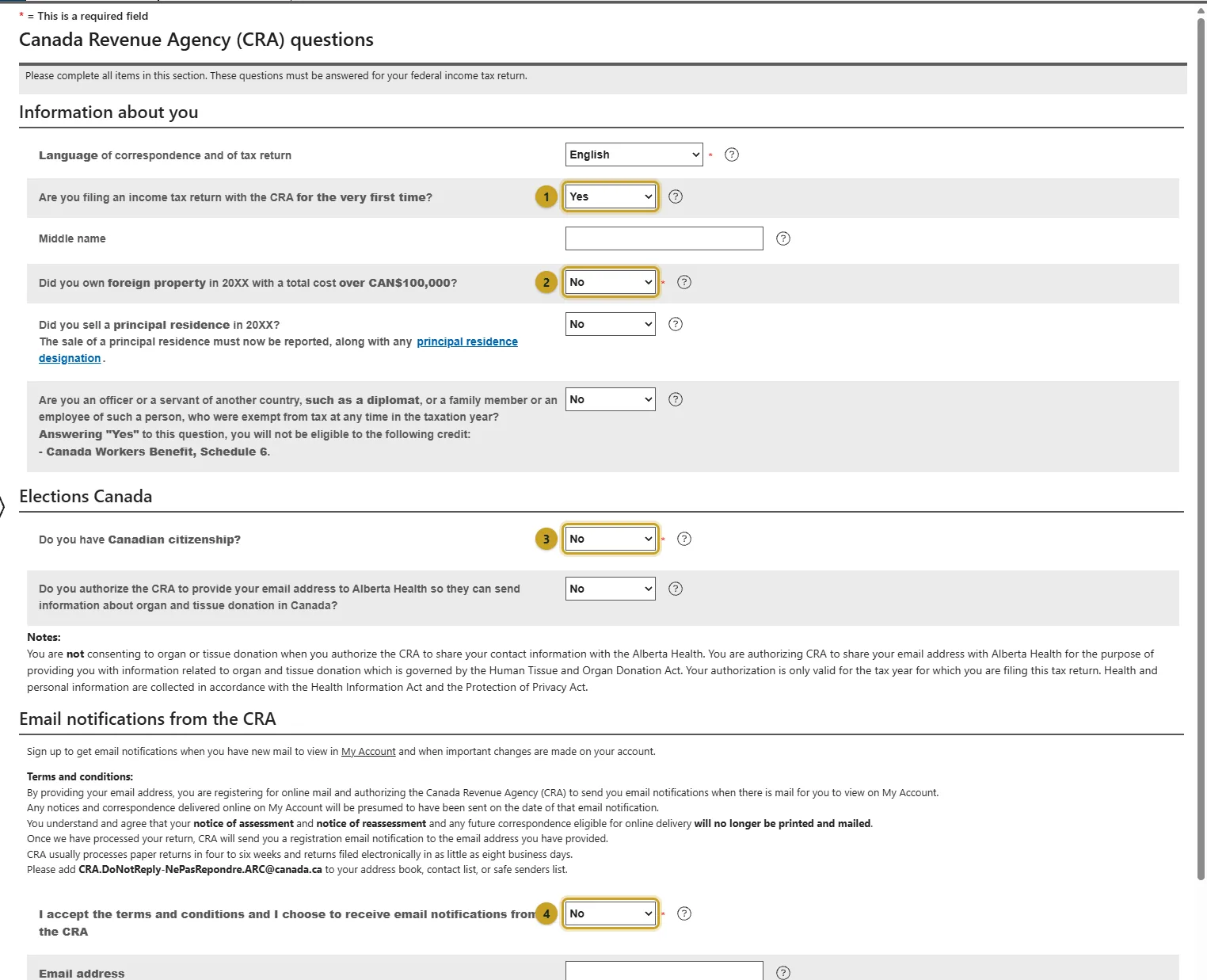
  3. Step 3: CRA questions

    Answer every question on this page. Two catch international students out. Filing for the very first time is Yes for your first Canadian return. Foreign property over CAN$100,000 counts money and property you hold outside Canada, such as bank accounts back home, if the total cost was over CAN$100,000 at any time in the year.
    1. Yes if this is your first Canadian tax return.
    2. Foreign property over CAN$100,000 in total cost. Include accounts and property outside Canada.
    3. Canadian citizenship. No for international students.
    4. Online mail from the CRA. Yes means your notices arrive in CRA My Account instead of by post.

    Source: Foreign property (Form T1135)

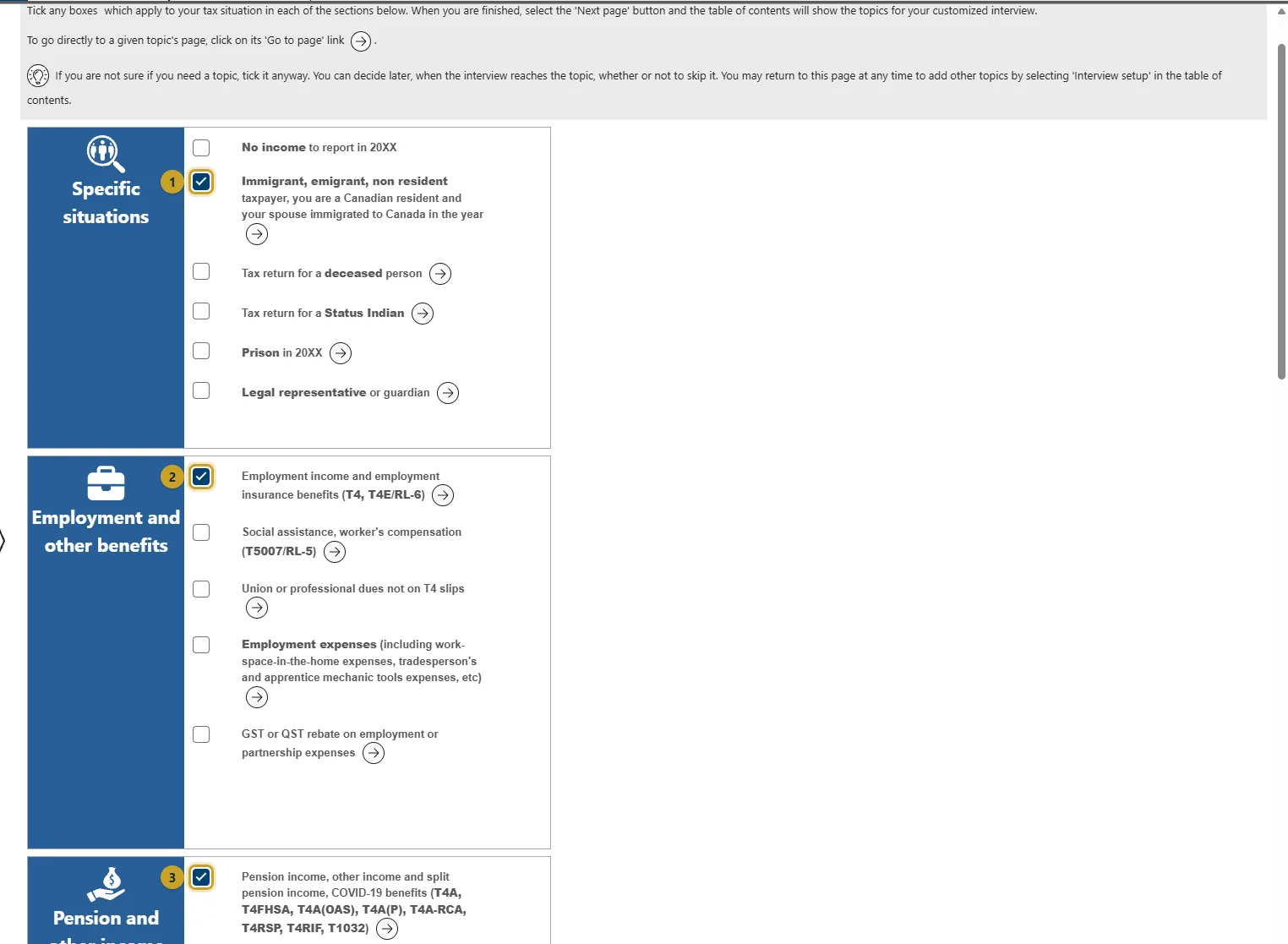
  4. Step 4: Interview setup: tick what applies to you

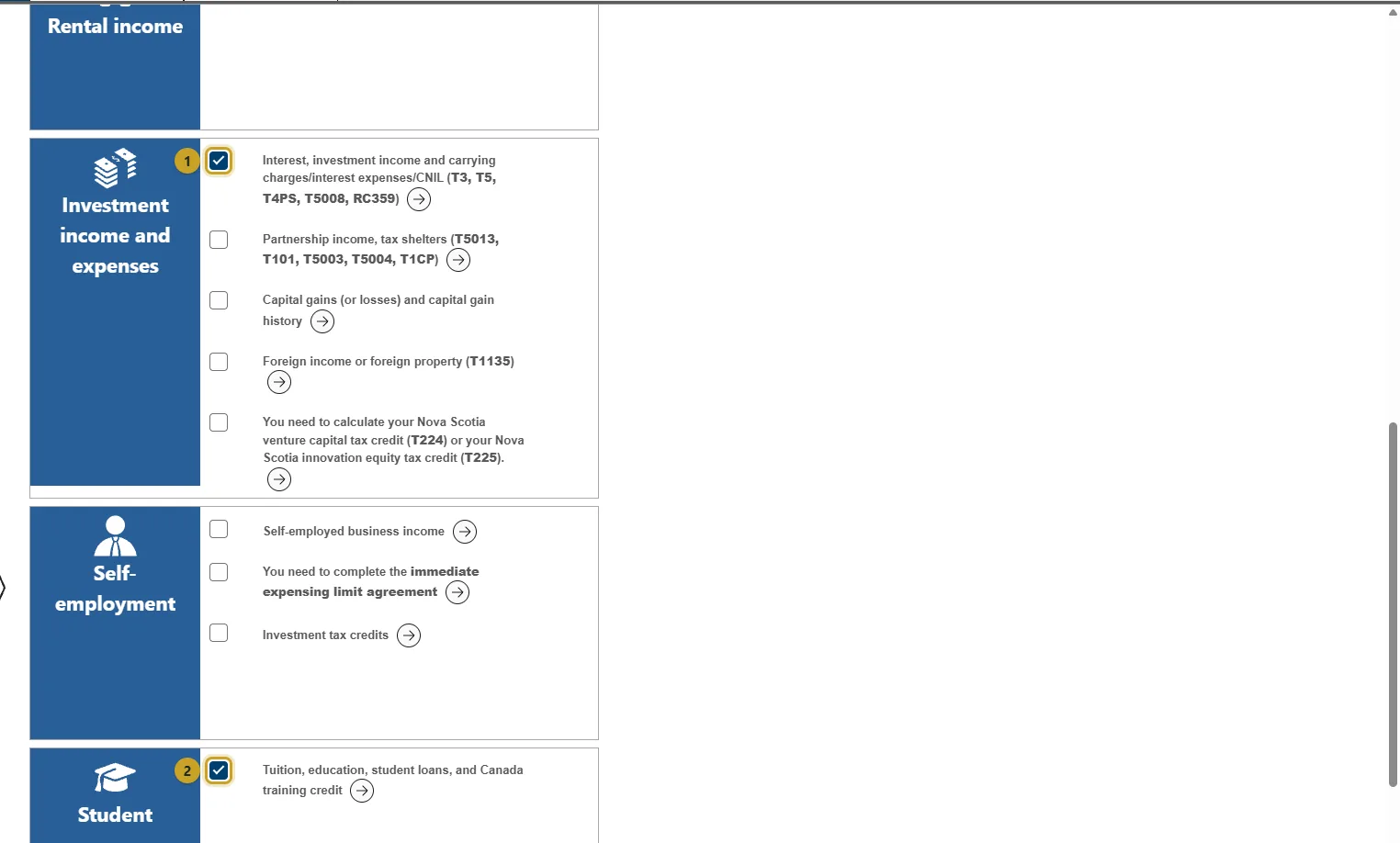
    This page decides which questions UFile asks, so a missing tick is how a slip gets left off. Tick Immigrant in the year you arrived, Employment income for a T4, Pension income, other income for a T4A (scholarships live here, not under student), Interest, investment income for a T5, and Tuition for your T2202. If you are unsure, tick it; you can skip it later.
    1. First image: Immigrant (your first year only), Employment income (T4), and Pension income, other income (T4A).
    2. Second image: Interest and investment income (T5) and Tuition (T2202).
  5. Step 5: First year only: Immigration to Canada

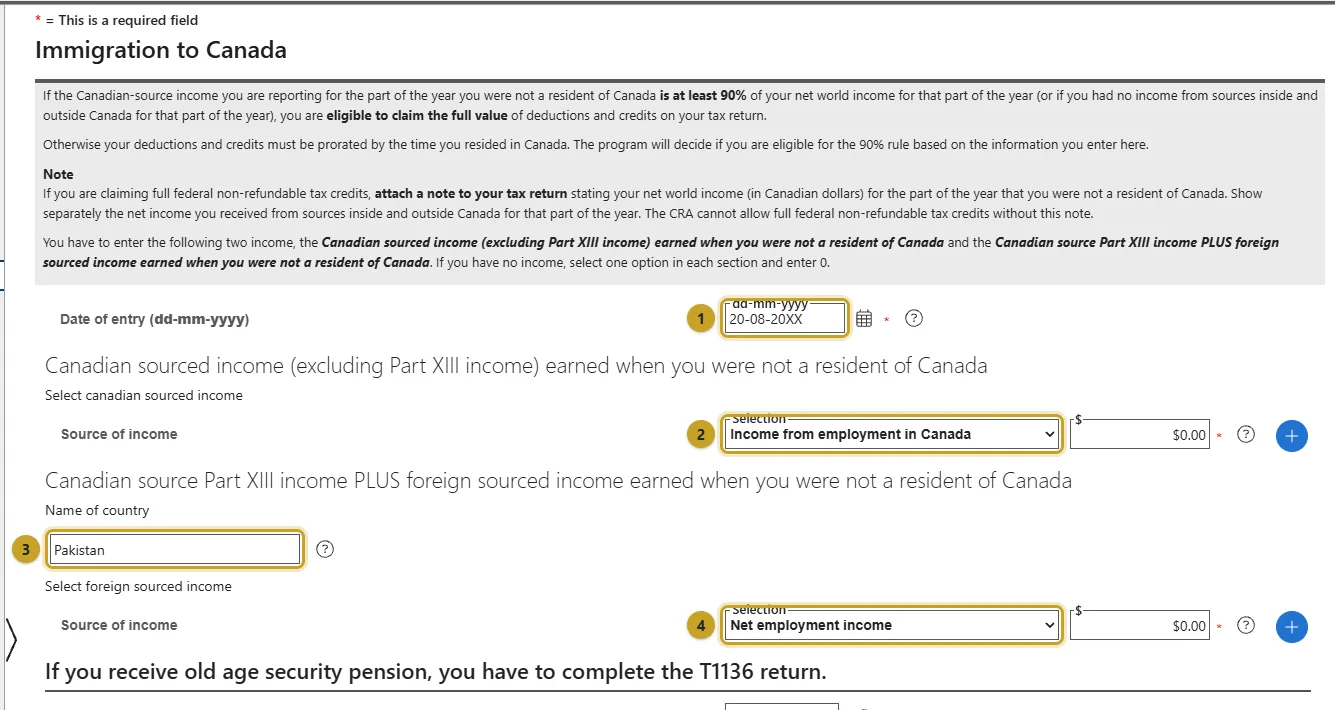
    Under the Immigrant topic, press + beside You immigrated to Canada in 20XX. Enter the date you arrived, then the income you earned before that date, first from Canadian sources and then from outside Canada with the country. If you had none, choose any source and enter 0 in each, as UFile's instructions on the page say. These figures decide whether you get full-year credits or credits for the part of the year you lived here.
    1. The date you entered Canada to live here.
    2. Canadian income before that date. Usually 0.
    3. The country you came from.
    4. Income from that country before you arrived, in Canadian dollars.

    Source: Newcomers to Canada and the CRA

  6. Step 6: T4: copy each box to the field with the same number

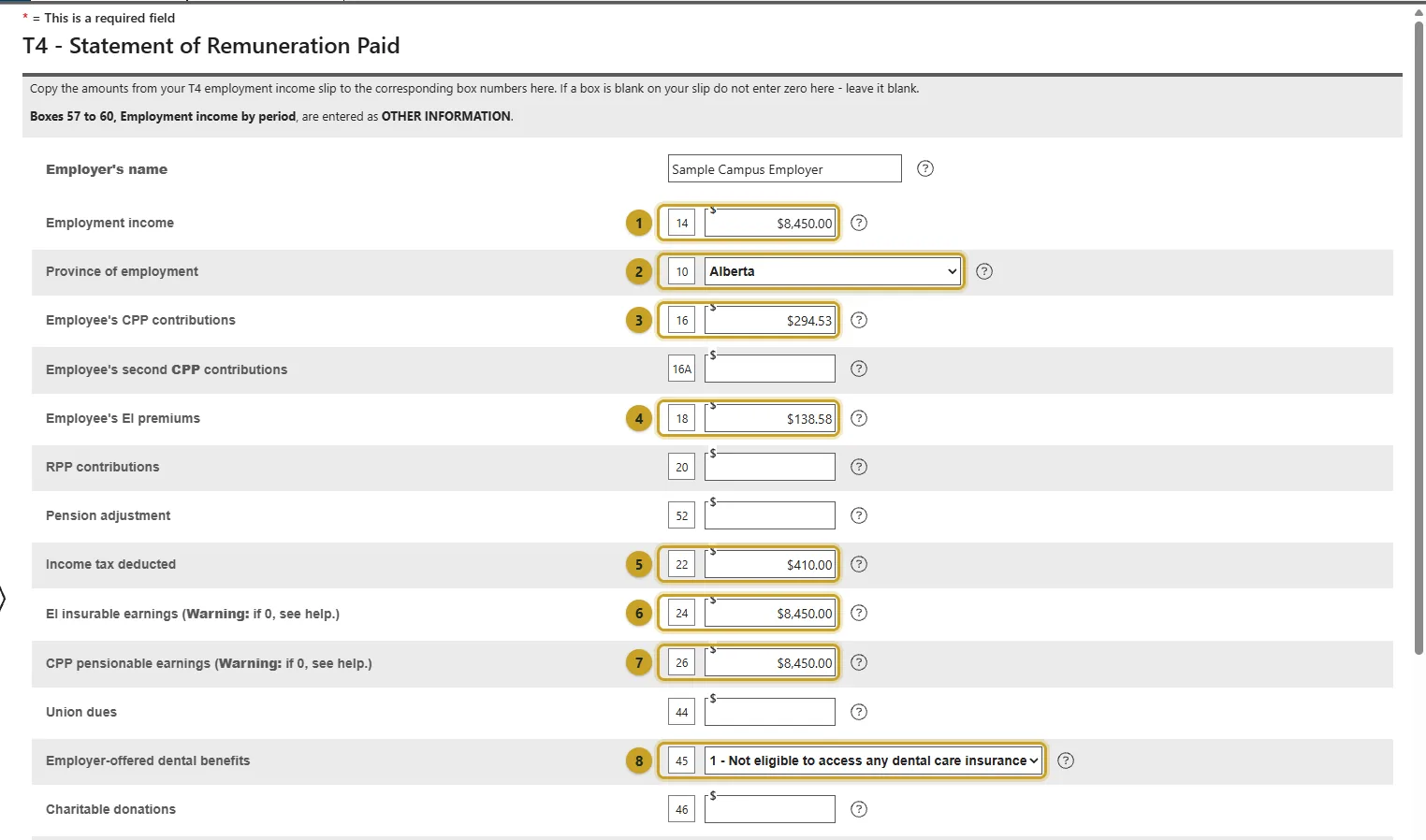
    Under T4 and employment income, press + beside T4 income (earned in any province except Quebec). Every field has the box number from your slip beside it: copy box 14 into the field marked 14, box 22 into 22, and so on. If a box is blank on your slip, leave it blank here, not 0. Two jobs means two T4s; add one, then come back and add the next.
    1. Box 14, employment income.
    2. Box 10, the province you worked in.
    3. Box 16, CPP contributions.
    4. Box 18, EI premiums.
    5. Box 22, income tax deducted. This is where most students' refund comes from.
    6. Box 24, EI insurable earnings.
    7. Box 26, CPP pensionable earnings.
    8. Box 45, the dental benefits code printed on your slip.
  7. Step 7: T5: interest from your savings account

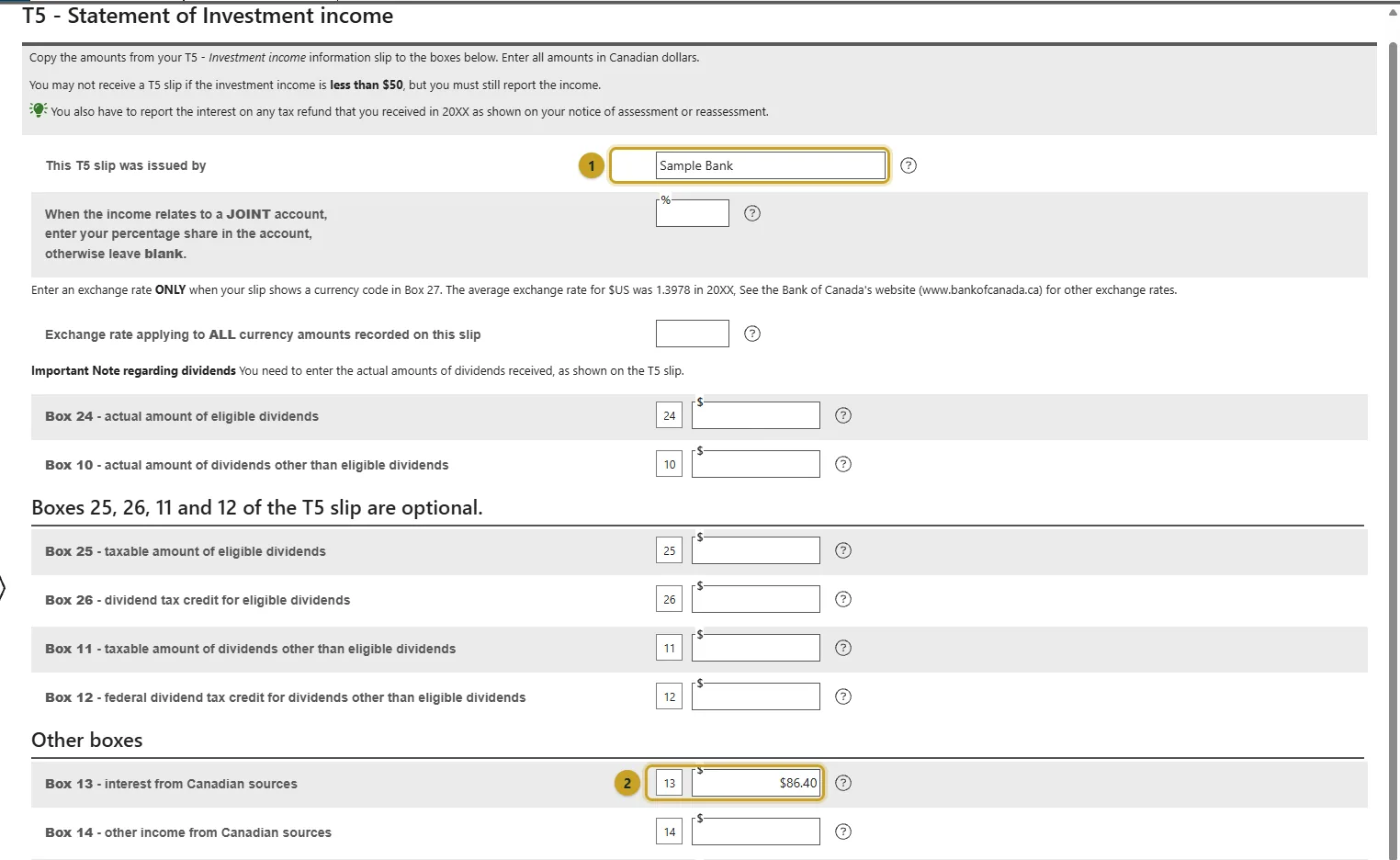
    Under Interest, investment income, press + beside T5 - Investment income, enter the bank's name and copy the boxes that have amounts, usually just box 13 for interest. Banks only send a T5 when interest reaches $50, but smaller interest still has to be reported; use Interest income not on information slips for that.
    1. The bank that issued the slip.
    2. Box 13, interest from Canadian sources.
  8. Step 8: T4A: scholarships, bursaries and awards

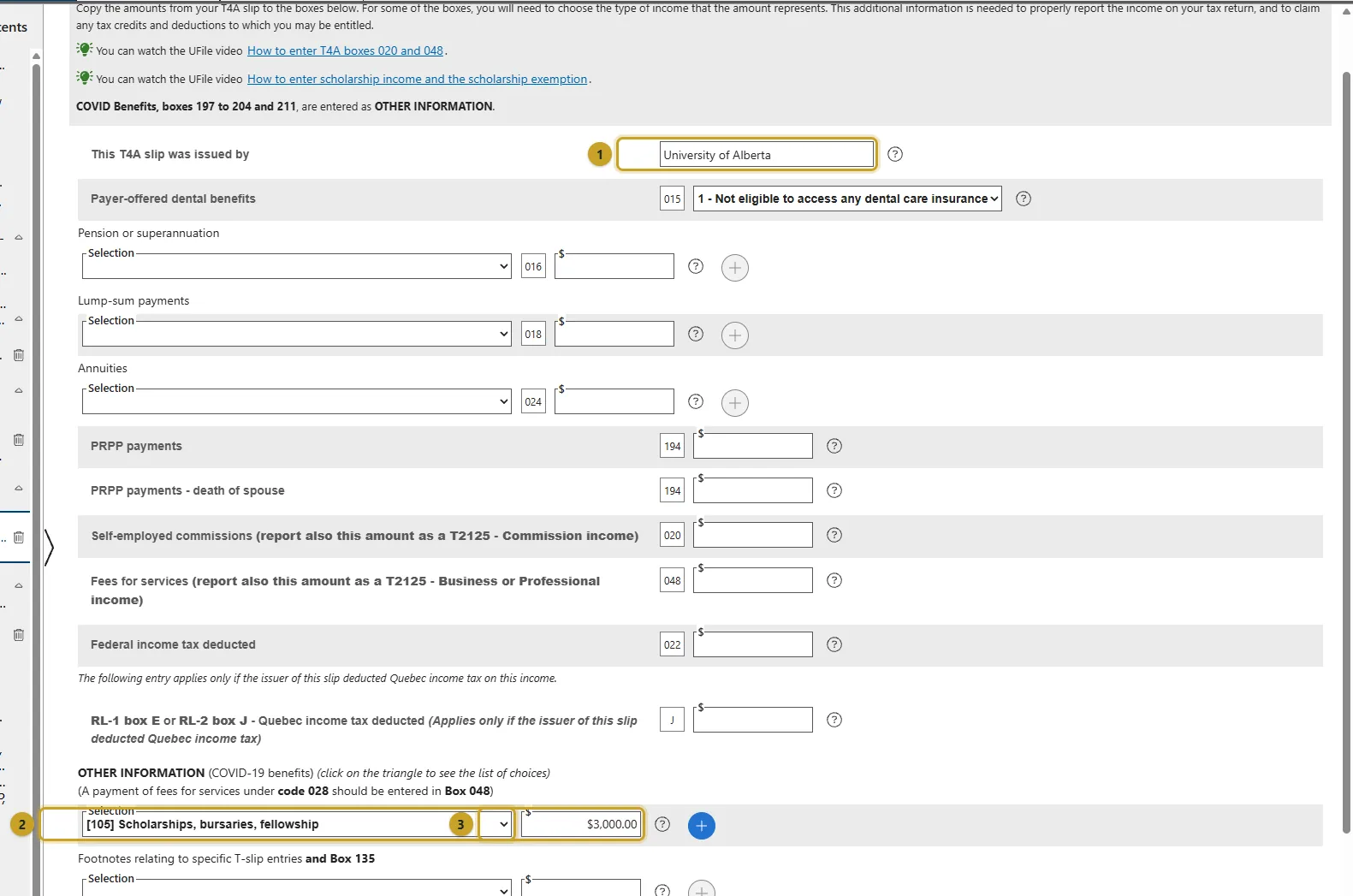
    A scholarship or bursary from the university arrives on a T4A in box 105. Under T4A, T4FHSA and pension income, press + beside T4A, enter who issued it, then scroll to Other information and choose [105] Scholarships, bursaries, fellowship with the amount. Enter it even if you expect no tax: a full-time qualifying student's post-secondary scholarship is generally fully exempt, and UFile applies the exemption using your T2202, which is why the T2202 step matters too.
    1. Who issued the T4A.
    2. Other information: choose [105] Scholarships, bursaries, fellowship.
    3. The amount from box 105.

    Source: Scholarships, fellowships and bursaries (line 13010)

  9. Step 9: T2202: tuition and months of study

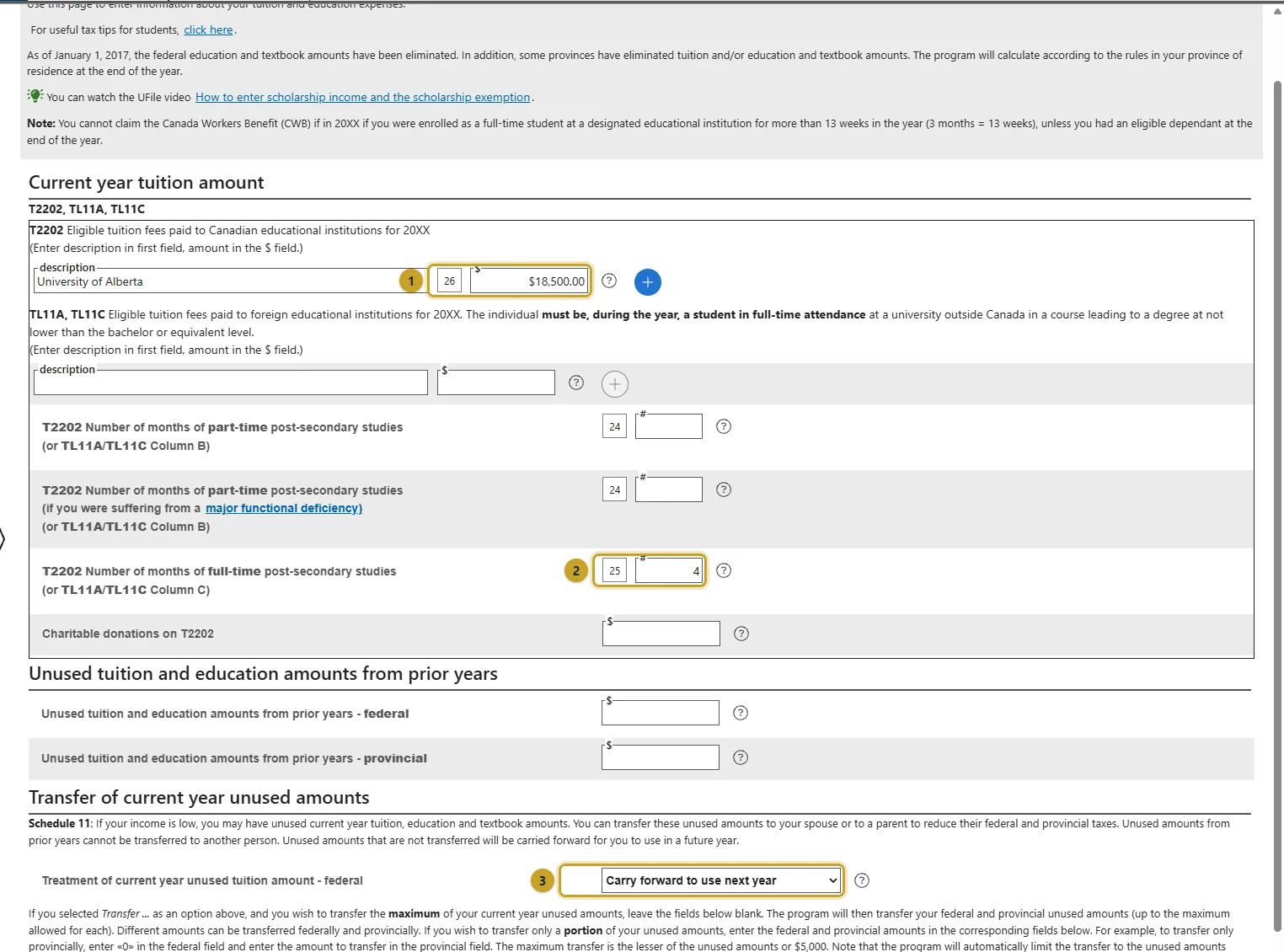
    Under Tuition, education, student loans, press + beside T2202. Enter the school and box 26, eligible tuition, then the months from box 25 (full-time) or box 24 (part-time). With little income you will not use the credit this year, and a parent who does not file a Canadian return cannot use a transfer, so choose Carry forward to use next year; the unused amount waits for a year you earn more.
    1. Box 26, eligible tuition fees.
    2. Box 25, months of full-time study.
    3. What to do with unused tuition. Carry forward keeps it for later years.
  10. Step 10: Enter the student code

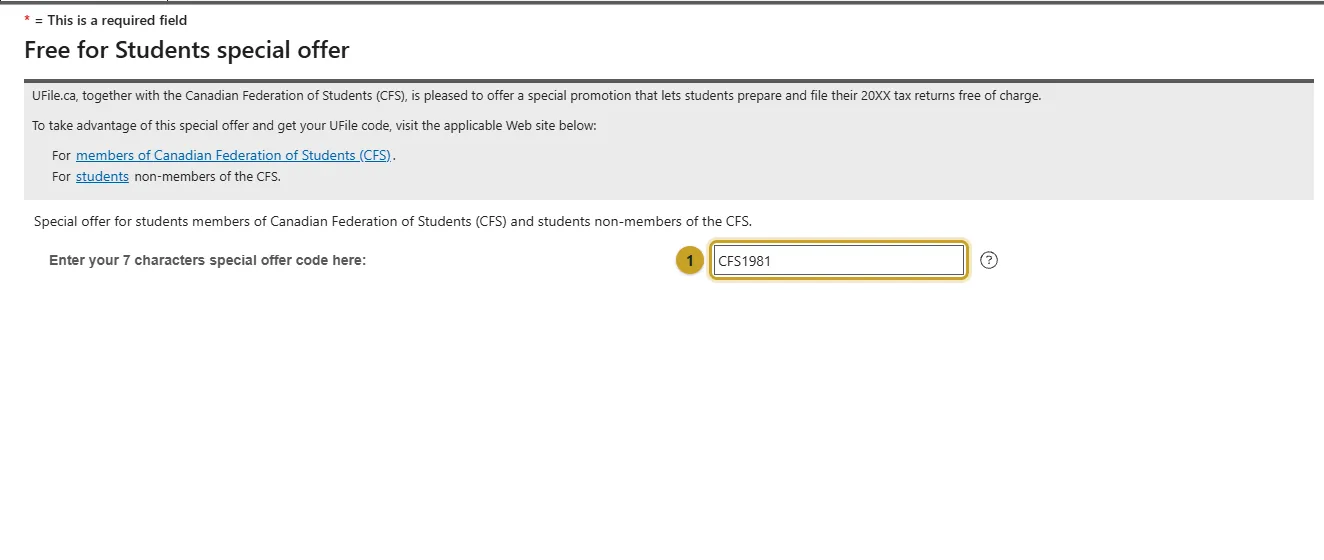
    Once your T2202 is in, Special offers appears near the bottom of the left menu. Enter the code CFS1981 there. The Review stage then says your return is free. Check UFile's student page for the current code before you file.
    1. The 7-character code, CFS1981.
  11. Step 11: If you are married: your spouse, here or abroad

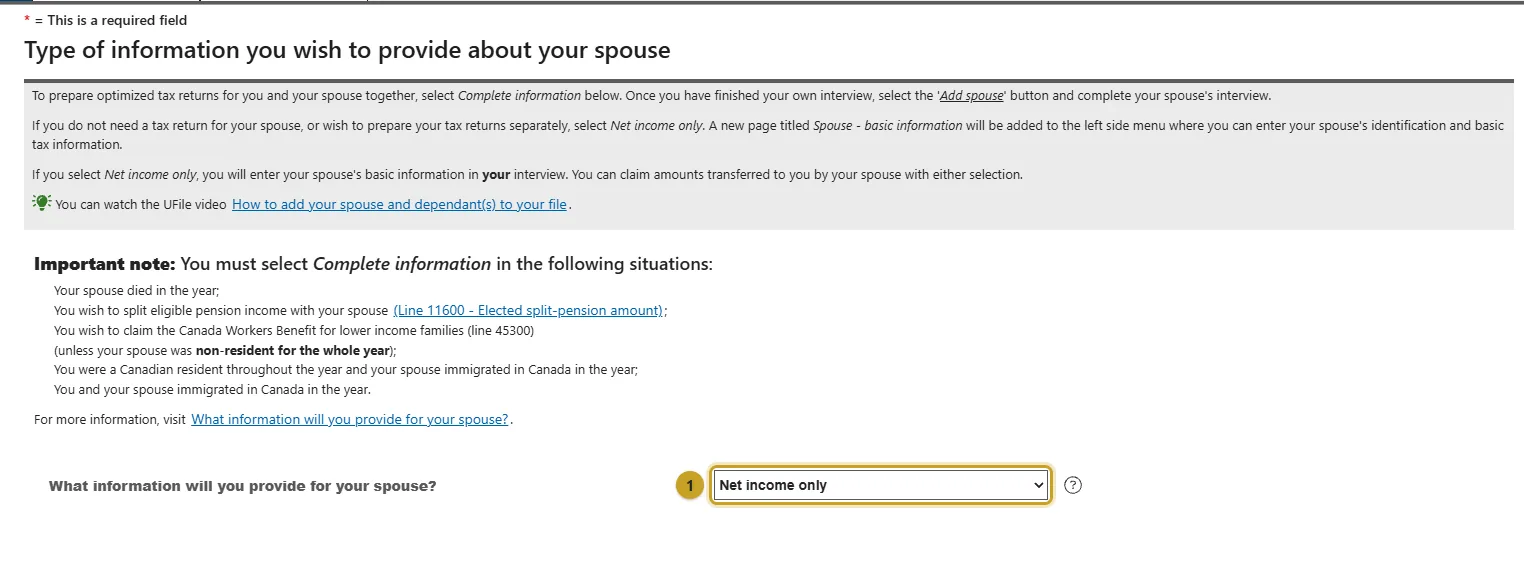
    Choosing Married or Common-law adds Spouse interview type to the menu. If your spouse lived outside Canada all year and does not file a Canadian return, choose Net income only and give their details, including their net world income in Canadian dollars, in your own return. UFile lists the cases that need Complete information instead, such as when you and your spouse both immigrated in the year. For benefits, the CRA also asks for a non-resident spouse's income on Form CTB9.
    1. Net income only for a spouse who lived abroad all year and does not file here.

    Source: Form CTB9, income of a non-resident spouse

  12. Step 12: If you have children

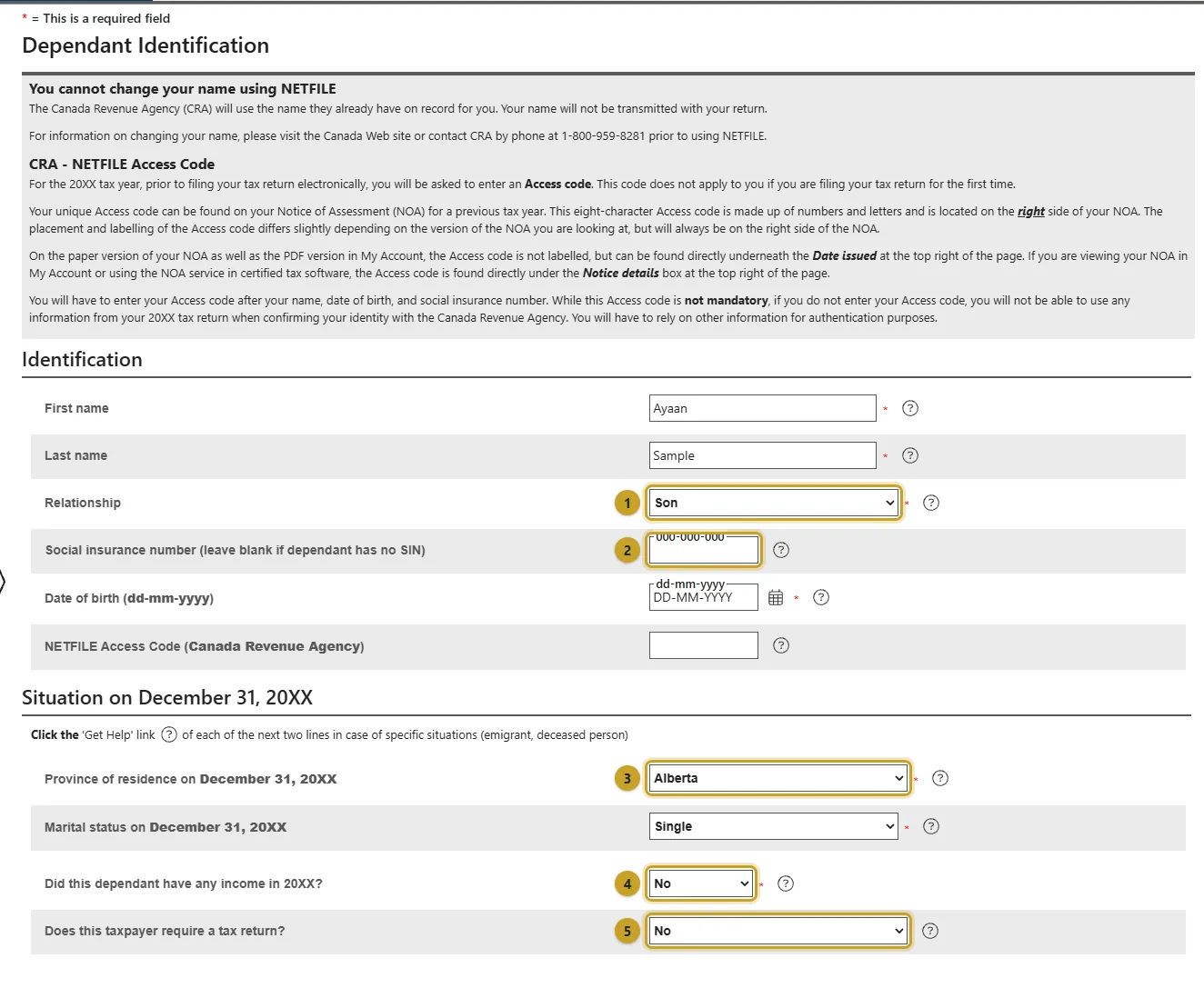
    Press Add dependant at the top for each child. Choose the relationship, leave the SIN blank if they do not have one, pick where they lived on December 31, and answer No to income and to needing a tax return for a young child. The Canada Child Benefit is a separate application (Form RC66, or through My Account): the child must live with you, and a temporary resident qualifies only after living in Canada for the previous 18 months with a valid permit in the 19th month.
    1. Relationship to you.
    2. SIN. Leave blank if your child does not have one.
    3. Where the child lived on December 31.
    4. Did the child have income?
    5. Does the child need a tax return? Usually No for a young child.

    Source: Canada Child Benefit: before you apply

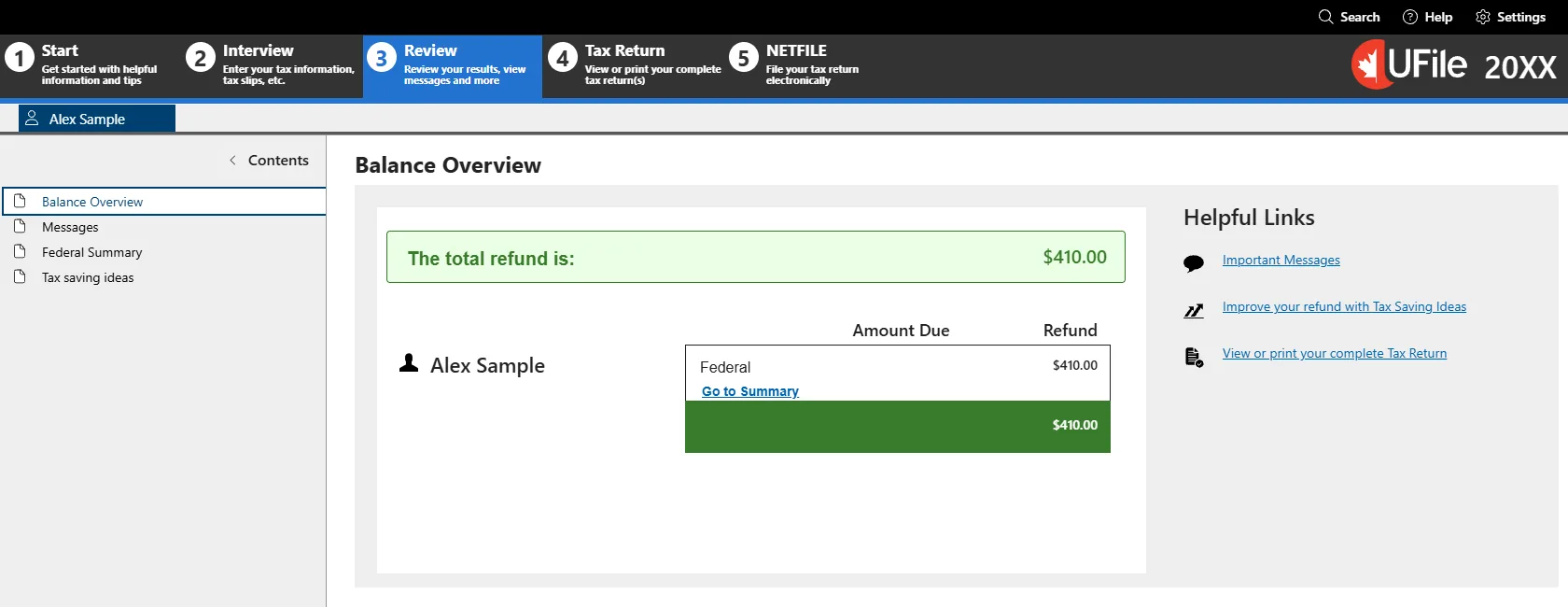
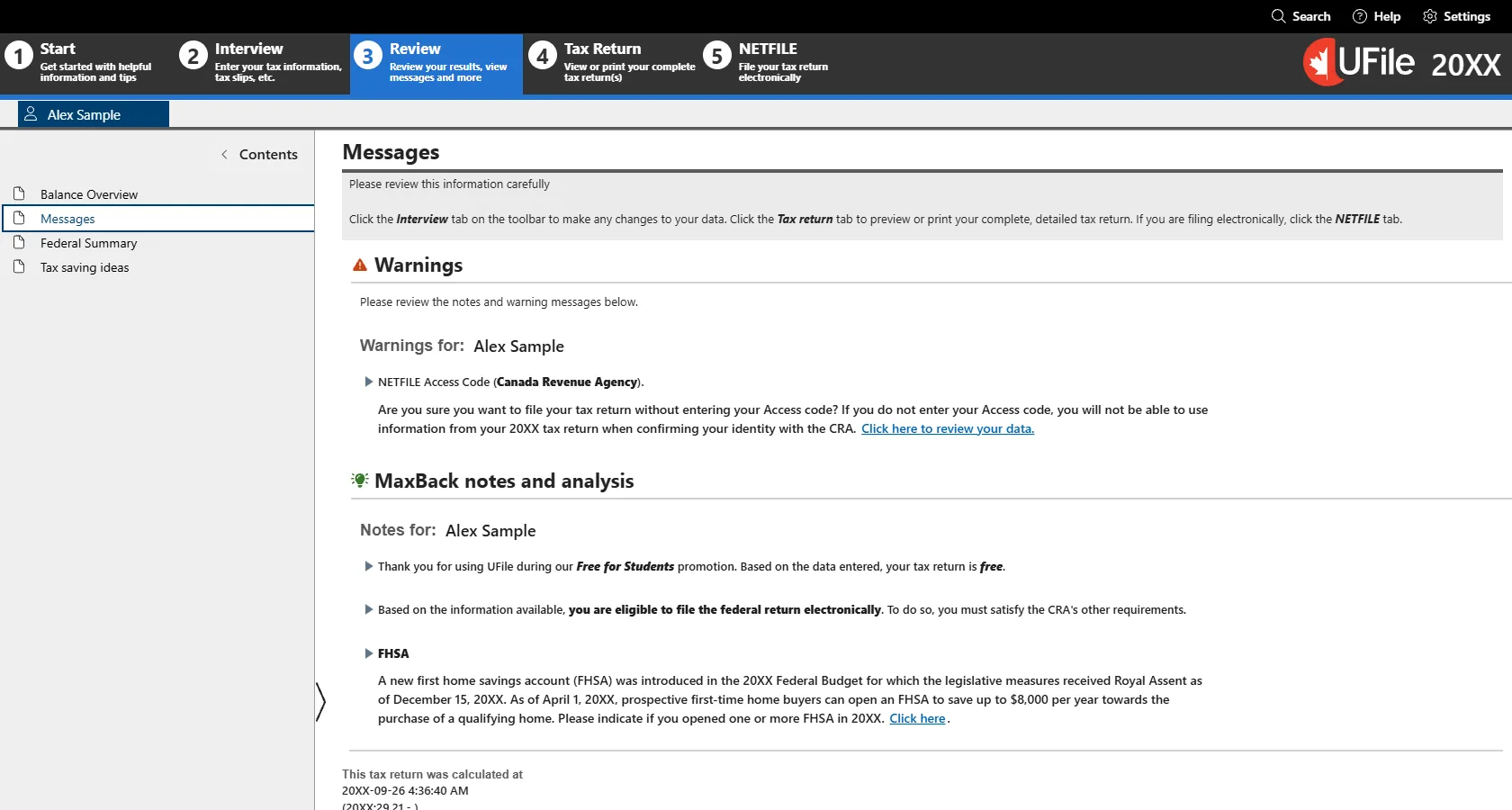
  13. Step 13: Review your refund and the messages

    Press Review at the top. Balance Overview shows your refund or what you owe. Then open Messages: fix anything under Errors, read the warnings, and look for the notes that your return is free and that you are eligible to file electronically.
  14. Step 14: Send it with NETFILE

    When Review shows no errors, open the NETFILE stage and follow its steps to send your return to the CRA; nothing is sent until you do. Keep the confirmation number it gives you. The CRA then mails or posts your Notice of Assessment, which has next year's Access Code. NETFILE does not change your address or banking details with the CRA, so update those in CRA My Account first. This guide stops before this stage because its example return is fictional.

    Source: NETFILE overview (CRA)
Tax questions8

  • Which tax software should I use, and does it cost anything?

    Any CRA-certified software can file your return with NETFILE. UFile ONLINE is free for post-secondary students at any income, NETFILE included: you enter its student code on the Special offers page after your T2202. If you would rather have a person do it, free tax clinics run by volunteers help people with a modest income and a simple tax situation. The Filing your taxes page on this site walks through UFile screen by screen.

  • Which tax slips do I need, and where do I get them?

    A T4 from each employer for work income, a T4A for scholarships, bursaries and awards (box 105), a T5 from your bank if you earned $50 or more in interest, and a T2202 for tuition, which UAlberta students download from Bear Tracks. Slips for a year arrive early in the next year; wait until you have them all before filing, because a slip left off means the CRA changes your return later.

    Before you rely on this

    • Interest under $50 has no T5 but still has to be reported.
  • Do I pay tax on my scholarship or bursary?

    Usually not, but you still enter the slip. Post-secondary scholarships, fellowships and bursaries are generally fully exempt when you were a full-time qualifying student in the program the award supports. Enter the T4A box 105 amount and your T2202, and the software applies the exemption. Part-time students and research grants follow different rules.

  • This is my first year in Canada. What is different about my return?

    You give the date you became a resident, report your world income from that date on, and report the income you earned outside Canada before arriving so the CRA can work out your credits and benefits. In UFile this is the Immigrant topic in Interview setup. To start receiving the Canada Groceries and Essentials Benefit for the year you arrived, newcomers send Form RC151, which is also available as a web form.

  • My spouse and children are still back home. What do I report?

    If you were married or common-law on December 31, you give your spouse's details and net world income in your return even if they lived abroad; in UFile that is Spouse interview type, set to Net income only when your spouse does not file in Canada. For benefits, the CRA also asks for a non-resident spouse's income on Form CTB9. The Canada Child Benefit needs the child to live with you, and a temporary resident qualifies only after living in Canada for the previous 18 months with a valid permit in the 19th month.

  • What happens to tuition credits I cannot use this year?

    They carry forward. With little income you do not need the tuition credit to reduce tax this year, so it is recorded and waits for a year when you earn more, which for many students is after graduation. You can transfer part of the current year's amount to a spouse or parent instead, up to the federal maximum, but only to someone who files a Canadian return and can use it.

  • Do I need a foreign property form for my bank account back home?

    Only if the total cost of your specified foreign property, which includes money in bank accounts outside Canada, was more than CAN$100,000 at any time in the year. Then you file Form T1135 with your return; in UFile you answer Yes to the foreign property question on the CRA questions page. Below that amount, answer No.

  • Can I file my very first return online?

    Yes, in most cases. UFile's Review stage tells you whether your return is eligible for NETFILE. The Access Code from a previous Notice of Assessment is optional and does not apply to a first return, so leave it blank. After you file, keep the NETFILE confirmation number; your Notice of Assessment arrives afterwards and has the Access Code for next year.

All 8 in the FAQ

Free help3

When your situation is not the one shown here.

  • Free tax clinics

    Official

    Volunteers prepare and file returns for free for people with a modest income and a simple tax situation. Many run on or near campus in March and April.

  • CRA: newcomers to Canada

    Official

    What to report in your first year, and how to apply for benefits with Form RC151.

  • CRA: students and income tax

    Official

    The CRA's own guide for students: scholarships, tuition, moving and more.

Guidance, not tax advice

This is a student-made guide to finding your way around UFile, not tax advice and not an official CRA or University of Alberta source. Your own situation decides what you enter. When a question here does not match yours, check the linked CRA page, a free tax clinic, or ISVS before you file. The screenshots come from a demo UFile ONLINE return for a fictional student, captured on September 26, 2026. Years are shown as 20XX and the SIN and date of birth are hidden, so the same screens work for whichever year you are filing. UFile changes its screens from time to time; treat the labels as a guide rather than an exact match.